The Prompt API is now on by default in Chrome
Today, Google released Chrome 148, and with it, the Prompt API is now enabled by default in desktop Chrome. First made available in mid-2024, it's no longer behind an 'Early Release', 'Beta', or 'Origin Trial'.
The Prompt API allows web pages to interact with an on-device language model managed by the browser:
const session = await LanguageModel.create();
await session.prompt("Knock, knock.");
// "Who's there?"See if your browser can use it:
How Chrome runs the model
Because the API uses an on-device model, it has to be downloaded first.
await LanguageModel.availability();
// 'unavailable' | 'downloadable' | 'downloading' | 'available'

await LanguageModel.create({
  monitor(m) {
    m.addEventListener("downloadprogress", (e) => {
      console.log(`Downloaded ${e.loaded * 100}%`);
    });
  },
});Chrome only starts the model download after a user interacts with a page that calls the API. Once installed, the model is shared with all pages browser-wide.
There are two builds of Gemini Nano that Chrome may download:
- A GPU build (~4 GB), used in either a
HIGHEST_QUALITYorFASTEST_INFERENCEmode depending on how powerful the GPU is - A CPU build (~2.7 GB), for devices without a usable GPU
How users and IT admins are going to react to un-prompted (ironic) 4 GB files being silently downloaded to a user directory can be left as an exercise for the reader.
Gemini Nano is not an 'open-weight' model like Google's other Gemma models. Google hasn't published the weights anywhere publicly, and there doesn't appear to be a public model card yet, just an unpublished webpage.
According to earlier blog posts, Gemini Nano v3 is based on Gemma 3n's architecture (released in May 2025), which does have a model card here. And if you ask the model what it is, it will often claim to be a Gemma model. Perhaps Gemini Nano is Gemma 3n, but with some post-training? Or 'Gemini' is just the term that Google wants to associate with consumer AI? Chrome devs have hinted that Chrome will likely move to a Gemma 4-based model soon.
You can see which model build Chrome loads by opening chrome://on-device-internals/ and checking the Model Status tab.
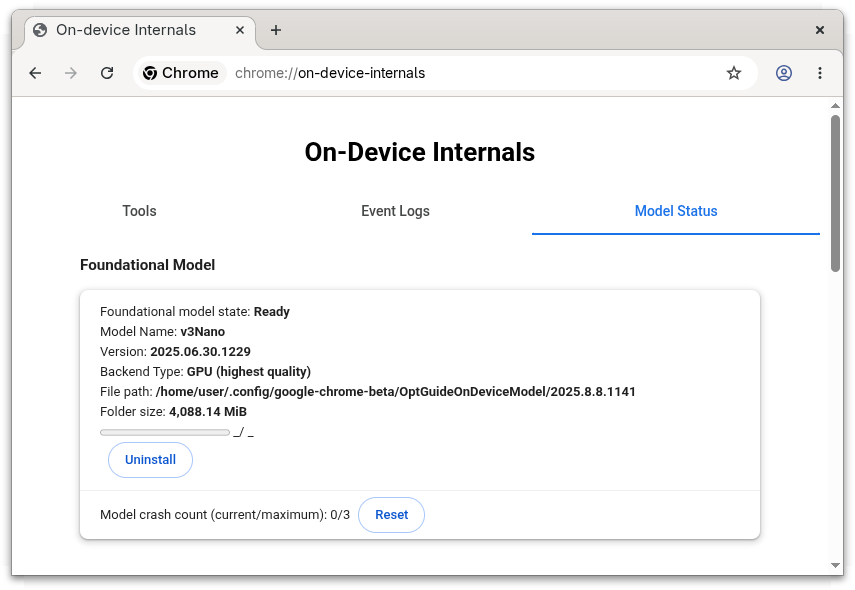
For example, on a discrete-GPU machine:
Model Name: v3Nano
Version: 2025.06.30.1229
Backend Type: GPU (highest quality)And on a machine without GPU acceleration:
Model Name: v3Nano
Version: 2025.08.14.1358
Backend Type: CPUYou can also interact with the model on that page:
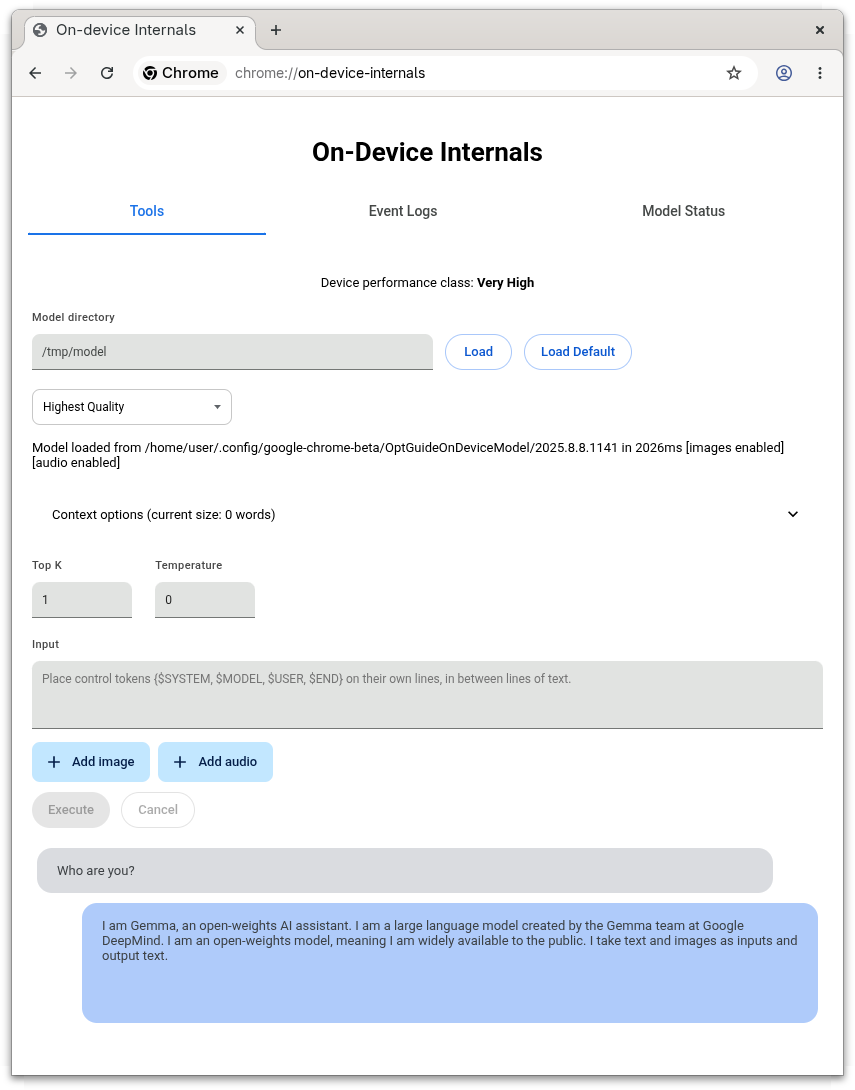
Chrome picks the build on first launch. It runs a short benchmark that measures simulated input_speed and output_speed, checks the GPU's VRAM, and bins the device into a PerformanceClass. The class determines Chrome's preferences when it tries to find a model to use:
| Class | Assigned when | Preferences in priority order |
|---|---|---|
kError |
benchmark failed to run | CPU |
kGpuBlocked |
GPU is on Chrome's blocklist | CPU |
kVeryLow |
VRAM < 3000 MiB, output_speed < 5 tok/s, or input_speed < 50 tok/s |
CPU |
kLow |
input_speed < 75 tok/s |
FASTEST_INFERENCE (GPU), CPU |
kMedium |
input_speed < 200 tok/s, or VRAM < 5500 MiB |
FASTEST_INFERENCE (GPU), CPU |
kHigh |
input_speed < 500 tok/s |
HIGHEST_QUALITY (GPU), FASTEST_INFERENCE (GPU), CPU |
kVeryHigh |
input_speed ≥ 500 tok/s |
HIGHEST_QUALITY (GPU), FASTEST_INFERENCE (GPU), CPU |
If Chrome's benchmark undersells your machine, you can try setting chrome://flags/#optimization-guide-on-device-model to Enabled BypassPerfRequirement to skip the gate.
The CPU backend is only available when there is at least 15000 MiB of RAM, 4 CPU cores, and a 64-bit processor. Otherwise the API reports unavailable.
For integrated GPUs (e.g. Apple Silicon), Chrome treats at least half of the system RAM as available VRAM.
To download the model, Chrome looks up a download link for CRX ID fklghjjljmnfjoepjmlobpekiapffcja, querying based on device hints (cpu_support, highest_quality_support, fastest_inference_support), and Google responds with a list of mirror URLs. The CRX3 archive is downloaded into a temp directory, verified, then unpacked into a per-version directory inside the Chrome user-data directory, under a component called OptGuideOnDeviceModel:
| OS | Path |
|---|---|
| Windows | %LOCALAPPDATA%\Google\Chrome\User Data\OptGuideOnDeviceModel\<version>\ |
| macOS | ~/Library/Application Support/Google/Chrome/OptGuideOnDeviceModel/<version>/ |
| Linux | ~/.config/google-chrome/OptGuideOnDeviceModel/<version>/ |
The directory contains:
weights.bin: the model weights (the bulk of the download)manifest.json: theBaseModelSpecname, version, andsupported_performance_hints:1=HIGHEST_QUALITY2=FASTEST_INFERENCE3=CPU
on_device_model_execution_config.pb: a config protobuf_metadata/verified_contents.json: a JWS-signed treehash of the other files, used by Component Updater to verify the install- Runtime caches written alongside the weights once the model has been loaded for the first time.
adapter_cache.binandencoder_cache.binare populated for both backends. The CPU build additionally writes acache.bin, which is the XNNPACK weight cache: the model weights repacked into the CPU backend's preferred format. It's ~1.3 GB, so the CPU directory ends up around 4 GB once warmed up, similar to the GPU one despite having smaller raw weights.
Here are the weights.bin sizes and hashes (these may change with a model update):
| Build | Version | Size | sha256 |
|---|---|---|---|
| GPU | 2025.06.30.1229 | 4.0 GB (4,269,932,544 bytes) | d7f18c99c451540bacafa09578f88f7428b0f316503b50e17f089eb0d4295fb1 |
| CPU | 2025.08.14.1358 | 2.7 GB (2,862,920,655 bytes) | fb4ad0fa9223ad862eb88712edd1b813bec11b4205c8046e5878b69fed5bb084 |
A few non-obvious things can prevent the install:
- Disk space: You need 20 GiB free on the volume holding the Chrome user-data directory, plus more than 2× the model size in your
TMPDIRto download the model. - Auto-uninstall: The model is removed after 30 days of API non-use, or if free disk drops below 5 GiB.
Unfortunately, the performance benchmarking, model loader, and inference engine aren't in the open-source Chromium tree. They're part of a proprietary blob (optimization_guide_internal) that Google ships only with its official Chrome builds:
| OS | Filename |
|---|---|
| Windows | optimization_guide_internal.dll |
| macOS | liboptimization_guide_internal.dylib (inside the .app bundle's Framework Libraries/) |
| Linux | liboptimization_guide_internal.so (alongside the chrome binary, ~26 MB stripped) |
The source is in Google's private src-internal repo, so we can't confirm what HIGHEST_QUALITY vs FASTEST_INFERENCE does, or see how the inference engine works. There is a flag that swaps the inference engine for LiteRT-LM, Google's open-source on-device LLM runtime: chrome://flags/#on-device-model-litert-lm-backend. It's disabled by default in Chrome 148, so today the model still runs through the closed-source ChromeML path.
Benchmarking the model
The Prompt API doesn't expose any built-in timing data, so to compare backends you have to time promptStreaming() yourself. The demo below runs a small fixed set of prompts and reports prefill speed (input tokens consumed up to the first streamed chunk) and decode speed (output tokens emitted from the first chunk to the last):
Chrome doesn't surface a way to switch backends in any UI, but with the command-line:
--enable-features=OnDeviceModelForceCpuBackend--optimization-guide-performance-class=N2=kVeryLow/ CPU4=kMedium/FASTEST_INFERENCE6=kVeryHigh/HIGHEST_QUALITY
--enable-features=OnDeviceModelFetchPerformanceClassEveryStartup
On a 12th-gen Intel Core i7-12800H (14 cores), 32 GB RAM, NVIDIA RTX A2000 8 GB Laptop GPU, running Arch Linux + Google Chrome 148, the benchmark gives:
| Backend | Threads | Process RAM | VRAM | Prefill | Decode | TTFT |
|---|---|---|---|---|---|---|
| CPU | 8 | ~2.7 GB | — | 183.4 tok/s | 15.4 tok/s | 498 ms |
GPU HIGHEST_QUALITY |
1 | ~700 MB | 3 GB | 1157.3 tok/s | 34.7 tok/s | 114 ms |
GPU FASTEST_INFERENCE |
1 | ~700 MB | 2 GB | 1668.4 tok/s | 48.0 tok/s | 100 ms |
The CPU build burns through 8 worker threads to do what one GPU helper thread plus a few GB of VRAM does five to ten times faster. FASTEST_INFERENCE trims about a gigabyte of VRAM versus HIGHEST_QUALITY and is roughly 45% faster at prefill and 40% faster at decode, presumably reflecting the cost of running the model at lower precision.
For comparison, running gemma3n:e4b (Q4, 8.3 GB) on the same machine through Ollama with all layers forced onto the GPU gets ~1000 tok/s prefill and ~40 tok/s decode, well short of either of Chrome's GPU modes on prefill but sitting between them on decode.
Which browsers support the API?
Because the inference happens in a binary blob, if you install chromium 148+ from your Linux distribution's package manager, the Prompt API won't work. Distro packages are built without optimization_guide_internal, so the model never downloads and LanguageModel.availability() returns "downloading" or "unavailable" regardless of your hardware. The same goes for CEF and other projects building from public Chromium (see chromiumembedded/cef#3982). To use the Prompt API today, you need an official Google® Chrome™ build.
Chrome on Android, iOS, and ChromeOS (on non-Chromebook Plus devices) doesn't support the API yet. When Android support arrives, it'll likely route through the OS's AICore service rather than downloading its own model. Google is trialling Gemini Nano 4 (based on Gemma 4) for AICore, with a rollout planned for later in 2026.
Mozilla has been trialling offline inference for extensions under a different API, but has announced that it does not support the Prompt API, saying that:
- The API does not report what model / version is being used. The workaround is to prompt the model and ask what it is:
const model = await LanguageModel.create();
await model.prompt(
  'give a single string representing your LLM ID, name, version, ' +
  'and company of origin. Only return that string'
);
// 'Gemini, 1.0, Google DeepMind'
// 'Gemini 1.0 Pro, Google DeepMind\n'
// 'Gemini, version 1.0, Google DeepMind'- Not having visibility into what model is running will cause issues with trying to work around the quirks of particular models, or use future models. This raises concerns around interoperability and tight-coupling.
- Google says that "Before you use this API, acknowledge Google's Generative AI Prohibited Uses Policy". It's not clear who Google would hold responsible for misuse under these terms. Website users? Web developers? Anyone and everyone?
- They believe that Google's claims that developers are "Strongly positive" about the API are overstated.
You can read responses from Chrome devs here and here.
The WebKit developers also oppose the API, echoing Mozilla's concerns and adding that:
- There's no user consent mechanism for running inference. This allows webpages to silently consume lots of battery, CPU, and GPU resources.
- The fact that the output's correctness is left as a quality-of-implementation issue is unique among the other web APIs. And that it was compared to the Shape Detection API also signals that quality variance will make it unreliable for developers.
- On platforms where browsers delegate running the model to the operating system, the way the OS provides this capability back to client applications may vary, and not map onto the 'lifecycle' that the Prompt API prescribes.
- Saying that on-device inference is "more private" is misleading, as the web page controls the prompts, and can read and exfiltrate the responses, possibly sharing them with third parties.
- The API is also a vector for browser fingerprinting.
Microsoft Edge was planning to ship the Prompt API in its next release on May 7th 2026, with its own model and inference engine (its underlying Phi-4-mini-instruct model is 'open-weight' and published on HuggingFace, though everything in Edge other than the Chromium / Blink base is closed-source). But a few days prior to release, an Edge developer announced on blink-dev that they would disable the API with a flag in Edge for now, citing concerns about unversioned models and limited developer feedback.
Chrome itself doesn't rate-limit Prompt API calls (but the proprietary blob might). Once the model has been downloaded for the first time, any page can call session.prompt() in a tight loop without further consent. Inference runs in one shared model service across all pages. The service does prioritise visible tabs over hidden ones, and a circuit breaker disables the API with exponential backoff if it crashes three times.
What could you build with it?
So despite all those concerns, what can you actually use it for in Chrome today?
Well, Google might say that it could be used to...
Dynamically classify and filter your news feed:
Help you write an email:
Help you understand an article:
Support user input in multiple languages:
Or with audio and images:
But thinking a little out of the box, you could...
Make everything you read sunshine and rainbows:
Use surrounding context to rewrite your ad copy:
Handle all your uncaught errors and fix the bugs:
Have a meeting with your web browser:
Or talk to other on-device AIs over WebRTC:
Look for something in your filesystem:
Browse the 'offline' internet:
Create art:
Let the AI write the webpage on the fly:
Or use it as a demo for an LLM chat app without having to pay for inference:
How does the API work?
So, back to the beginning. How do you use the API?
Start by checking whether your desired mode of interaction is available:
await LanguageModel.availability({
  expectedInputs: [{ type: "text", languages: ["en"] }, { type: "image" }],
  expectedOutputs: [{ type: "text", languages: ["en"] }],
});
// 'available' | 'downloadable' | 'downloading' | 'unavailable'If the answer is "downloadable", calling LanguageModel.create() will start the download, provided it is called from a user gesture. If a LanguageModel session has previously been created, including by another page, the model won't be downloaded again.
const session = await LanguageModel.create({
  expectedInputs: [{ type: "text", languages: ["en"] }],
  expectedOutputs: [{ type: "text", languages: ["en"] }],
});prompt() returns a string. promptStreaming() returns a ReadableStream<string> of strings:
await session.prompt("In one word, what's the capital city of Australia?")
// 'Canberra'

const stream = session.promptStreaming("What are some good names for dogs?");
for await (const chunk of stream) console.log(chunk);
// 'Okay' ',' ' here' '\'' 's' ' a' ' numbered' ' list' ' of' ' dog' ' names' ...You can either pass a single string, or an array of {role, content} messages where role is "system", "user", or "assistant".
The system role must come first if it's present at all, and there can only be one.
const session = await LanguageModel.create({
  initialPrompts: [
    { role: "system", content: "You are an angry boss." },
    { role: "user", content: "Can I go home yet?" },
    { role: "assistant", content: "Absolutely not!" },
  ],
});

await session.prompt("But I've finished my work.")
// 'Not till I say you're done!!'A trailing assistant message can provide a prefix to pre-fill the start of the model's reply:
await session.prompt([
  { role: "user", content: "Give me a YAML destinations list for a European holiday" },
  { role: "assistant", content: "```yaml\n", prefix: true },
]);
// '```yaml\ndestinations:\n - name: Paris, France...'For multimodal inputs, append() lets you load context into the session ahead of the user's actual question. Appending early lets the model work while waiting for user input.
fileUpload.onchange = () => session.append([{
  role: "user",
  content: [
    { type: "text", value: "Here's the image I'd like to discuss:" },
    { type: "image", value: fileUpload.files[0] },
  ],
}]);

askButton.onclick = () => session.prompt(question.value);The LanguageModel spec has tools: [{name, description, inputSchema, execute}] with the runtime auto-calling execute and returning the final string. However, Chrome 148 does not support this functionality. Google might look at adding it when they ship a Chrome model derived from Gemma 4.
The workaround is to use responseConstraint with a JSON schema of tools that the model fills in turn-by-turn:
const toolSchema = {
  type: "object",
  properties: {
    tool_calls: {
      type: "array",
      items: { anyOf: [
        { properties: {
          name: { const: "add" },
          args: { properties: { a: { type: "number" }, b: { type: "number" } } },
        }},
        { properties: {
          name: { const: "multiply" },
          args: { properties: { a: { type: "number" }, b: { type: "number" } } },
        }},
      ]},
    },
    final_answer: { type: "number" },
  },
};

const tools = {
  add: ({ a, b }) => a + b,
  multiply: ({ a, b }) => a * b,
};

const session = await LanguageModel.create({
  initialPrompts: [{ role: "system", content:
    "Tools: add(a, b), multiply(a, b). " +
    "Reply with JSON {tool_calls, final_answer}. " +
    "Call tools until you have the answer, then set final_answer." }],
});

let next = "What's (47 + 31) * 6?";
for (let i = 0; ; i++) { // The 'Agentic Loop'
  const { tool_calls, final_answer } = JSON.parse(
    await session.prompt(next, {
      // A JSON schema, or a RegExp
      responseConstraint: toolSchema,

      // Don't include the schema in the system prompt
      // omitResponseConstraintInput: true,
    }),
  );
  if (final_answer != null) { console.log({final_answer, i}); break; }
  const results = tool_calls.map(c => ({
    name: c.name,
    result: tools[c.name](c.args),
  }));
  next = `Results: ${JSON.stringify(results)}`;
}
// { final_answer: 468, i: 2 }responseConstraint accepts either a JSON Schema object or a regular expression, and constrains the format of the model's string output. Constraints can hurt the response quality if your instructions are poor or you don't give the model room to reason before answering.
Prompt API inputs can be text, image, or audio.
Image values can be a:
HTMLImageElementSVGImageElementHTMLVideoElementHTMLCanvasElementImageBitmapOffscreenCanvasVideoFrameBlob
Audio values can be a:
AudioBufferArrayBufferViewArrayBufferBlob
const session = await LanguageModel.create({
  expectedInputs: [{ type: "text" }, { type: "image" }, { type: "audio" }],
});

const blob = await (await fetch("https://picsum.photos/200/300")).blob();

await session.prompt([{
  role: "user",
  content: [
    { type: "text", value: "What's in this picture?" },
    { type: "image", value: blob },
  ],
}]);
// 'A rocky coastline next to a calm ocean'For multilingual input and output, pass the language code:
const session = await LanguageModel.create({
  // Pass the languages your app uses
  // These are the languages currently supported by Chrome 148
  expectedInputs: [{ type: "text", languages: ["en", "ja", "es"] }],
  expectedOutputs: [{ type: "text", languages: ["en", "ja", "es"] }],
});The session has a fixed token budget:
console.log(`${session.contextUsage} / ${session.contextWindow} tokens`);
// '382 / 9216 tokens'

session.addEventListener("contextoverflow", () => {
  // The oldest prompt/response pair in the session was just dropped.
  // (never the system prompt)
});

await session.measureContextUsage("How many tokens is this?");
// 11

await session.prompt("Really long prompt that exceeds the window...")
// Uncaught QuotaExceededError: The input is too large.Sessions can be cloned, aborted, and destroyed:
const controller = new AbortController();
const session = await LanguageModel.create({ signal: controller.signal });

const branch = await session.clone();
const reply = await session.prompt("Hello?", { signal: controller.signal });

session.destroy();

await session.prompt("Hello?")
// Uncaught InvalidStateError: Failed to execute 'prompt' on 'LanguageModel': The model execution session has been destroyed.
await branch.prompt("Hello?")
// 'Hi!'The Prompt API has a Permissions Policy called language-model. By default, it's available in the top-level document and any same-origin iframes. Cross-origin iframes need explicit delegation:
<iframe src="https://example.com/" allow="language-model"></iframe>The API isn't exposed in Worker, SharedWorker, or ServiceWorker contexts in Chrome 148, but it is available in extension ServiceWorkers.
Final observations
If you don't want to be locked-in to Gemini Nano in Chrome, there are a few other ways to run a model in the browser:
- transformers.js: Hugging Face's library for running ONNX-converted models via WebAssembly or WebGPU.
- WebLLM: MLC's runtime for running full LLMs in the browser via WebGPU.
- WebNN: A proposed lower-level browser API for hardware-accelerated neural network inference. It's behind a flag in Chrome, and
transformers.jscan use it as a backend.
The trade-off is that every site has to get the user to re-download its own weights, since there's no shared cross-site cache. But you can pick whichever model you like.
So should you be doing on-device inference using the Prompt API?
It's probably fine for small progressive enhancement / private AI use cases. However, the fact that only Chrome supports the API, that it might trigger a 4 GB download, and that it's not the best model means it's unlikely to be much more than a niche toy for now, especially when you can easily do most of the same tasks cheaply by running a tiny model on a server.
Now that it's rolling out more widely, expect lots more discussion and unusual use cases to follow.
Discuss this post on Hacker News.
References
- Google Chrome Prompt API docs: https://developer.chrome.com/docs/ai/prompt-api
- GitHub repository: https://github.com/webmachinelearning/prompt-api
- W3C CG Draft Report: https://webmachinelearning.github.io/prompt-api/
- The other 'Built-in AI' APIs: https://developer.chrome.com/docs/ai/built-in-apis
- Relevant chromium source:
- Chrome feature status: https://chromestatus.com/feature/5134603979063296
- Blink intent to ship: https://groups.google.com/a/chromium.org/g/blink-dev/c/iR6R7-nQeHI/m/gN4iEGEdAQAJ
- Gemma 3n announcement: https://developers.googleblog.com/en/introducing-gemma-3n/
- Gemma 3n model card: https://ai.google.dev/gemma/docs/gemma-3n/model_card
- Microsoft Edge docs: https://learn.microsoft.com/en-us/microsoft-edge/web-platform/prompt-api
- Performance in prod: https://sendcheckit.com/blog/ai-powered-subject-line-alternatives
- HN Discussions: